Keep sites current
Handle supported plugin, theme, update, and site-health work from one conversation.
Connect any AI client that supports remote MCP and a supported authentication method—Claude, Codex, ChatGPT web, and Grok have been tested. Request supported WordPress, SEO, plugin, and WooCommerce work, then review the proposed action and confirm it in your chat.
Start your 7-day free trial↗AI Web Command makes WordPress operational work feel like a simple conversation—while permission-scoped access, activity visibility, and checkpoints stay in place.
Handle supported plugin, theme, update, and site-health work from one conversation.
Update pages, SEO titles, descriptions, media, and supported on-page content in plain language.
Review WooCommerce orders, products, stock, and sales summaries. Reports have query limits and are not a substitute for accounting.
Use the managed-snippet workflow to review a proposed change, then confirm before enabling or disabling it.
Use the assistant you already trust. AI Web Command turns everyday WordPress requests into clearly scoped actions across your connected sites.
Ask for a draft, edit an existing page, update media, or publish a supported change with the context your site already has.
Connect once through MCP, then work with the parts of WordPress that matter most—without jumping between admin screens.
Draft, update and publish supported content.
Improve titles, descriptions and on-page content.
Review, activate or disable small changes.

Review sales, deliveries and new orders.
Check prices, products, variations and inventory.
Restore supported work when you need to go back.
Start a 7-day trial, sign in to the dashboard with your store account, download the plugin, and connect your WordPress site from AI Web Command → Connection.
“Connect any AI client that supports remote MCP and a supported authentication method, then request supported WordPress work.” OAuth is recommended when your AI client supports it.
MCP changes include a preview and require your confirmation in chat. Activity logs and applicable checkpoints help you verify or restore supported work.
Create a checkpoint before supported work. If the result is not right, restore it instead of rebuilding the change manually.
Give each connection only the access it needs. Keep an audit trail of activity and a recovery route for supported changes.
Permission-scoped, revocable tokens
Visible activity across connected sites
Checkpoints for supported work
Routine updates, content edits, and store questions can keep interrupting your team. Use your own numbers to estimate the monthly cost of that recurring work—not a savings guarantee.
Based on the inputs above. AI Web Command does not replace review for work that needs specialist judgment.
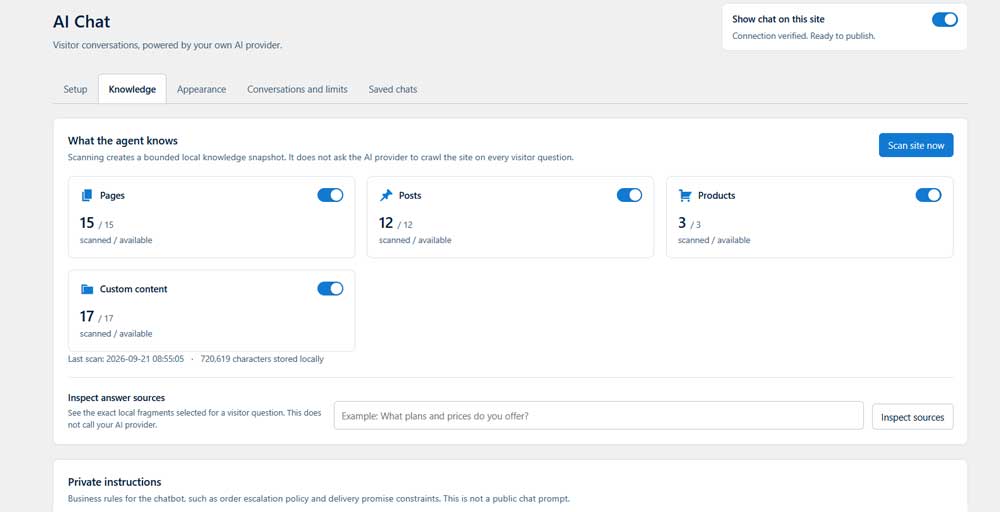
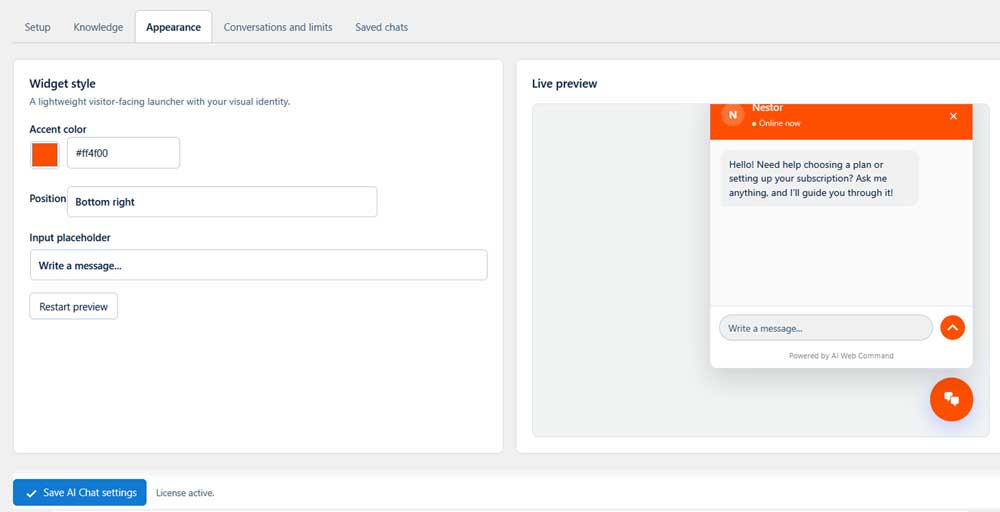
Give visitors helpful answers drawn from your own website. Help them explore products, understand your services, and leave their contact details when they want to take the next step.
Scan selected pages, posts, and products to build a local knowledge snapshot. Rescan after important published updates so the chat can use current content.
When a visitor asks for a person, the chat can request one contact method and create a follow-up for your team.
Enable conversation saving if you want to review chats and understand what visitors are asking. You decide whether conversations are stored.
Included. Ready to connect. Activate visitor AI Chat with your own OpenAI, Anthropic, or Google Gemini API key and match the widget to your brand. The key is stored encrypted in WordPress, and provider usage is billed separately. MCP-based site management does not require a separate AI provider key.
Every plan includes the core AI Web Command platform. Scale by site count, agency workflows, and visitor AI Chat capabilities.
Or $119/year — save $61
Or $299/year — save $169
Or $699/year — save $369
All plans include a 7-day free trial. Connect any AI client that supports remote MCP and a supported authentication method to manage your WordPress sites—no separate API key required for site management.
This site may use third-party services that receive technical visitor data. Choose which optional services you would like to allow.
Essential cookies keep the site working and remember your privacy choices. Optional services are available only when you choose to allow them.
Necessary cookies are required for basic site features, security, and saving consent preferences. These cannot be switched off from this banner.
No optional third-party services were found by the latest site scan yet. Browser-visible cookies are still listed below when available.
This list is checked on the current page. Browser security rules prevent any consent tool from reading HttpOnly or third-party cookies directly.